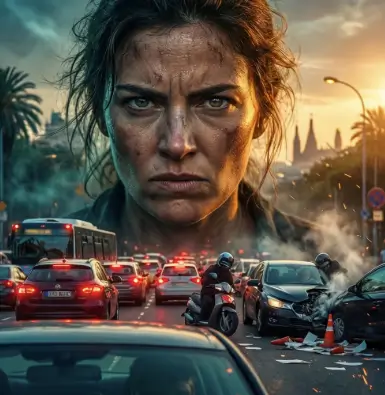
A movie poster is the first point of contact between a film and its potential audience. It carries a heavy responsibility: it must capture the tone, genre, star power, and core narrative of a multi-million-dollar project in a single static frame. Traditionally, creating a Hollywood-grade movie poster required an extensive pipeline involving high-end photoshoots, celebrity scheduling, complex digital manipulation, and weeks of design iterations by expensive marketing agencies.
As we advance through 2026, artificial intelligence has completely rewritten the rules of the entertainment marketing industry. AI is no longer a tool just for rough drafts; it has become a central engine for creating theatrical-grade promotional assets. From indie filmmakers operating on tight budgets to major streaming platforms managing massive global rollouts, AI-driven poster design is changing how stories are packaged, pitched, and sold to the public.
The Shift from Complex Studio Layouts to Automated Ideation
In the traditional film marketing cycle, designing a poster was a slow and rigid process. Designers had to work with limited assets—often restricted to the specific promotional stills captured on set during production. If a director wanted to test a completely different conceptual direction—like placing the protagonist in front of a burning surrealist skyline instead of a simple dark background—it meant hours of manual masking, color grading, and heavy stock-photo hunting.
AI has flipped this dynamic. By utilizing advanced generative models, graphic designers can now bypass the physical limits of on-set photography. They can generate completely custom environments, tweak character expressions, and test diverse lighting profiles instantly through simple text instructions. If you are looking to create high-impact promotional graphics, utilizing a professional tool for AI movie posters allows you to experiment with varied cinematic genres—from gritty true-crime thrillers to sprawling high-concept space operas—in a matter of seconds.
[ Script Hook & Genre ] ➔ [ AI Character & Environmental Synthesis ] ➔ [ Cinematic Contrast & Texture Pass ] ➔ [ Typography & Billing Block Placement ]
Crafting Dynamic Campaigns with Cinematic Marketing
The real magic of AI poster design lies in its capacity for high-volume, hyper-targeted narrative deployment. Modern entertainment consumption is incredibly fast-paced, and streaming platforms rely heavily on A/B testing to capture user attention. A single movie might require ten different thumbnail variants or poster formats depending on whether it is being promoted to an action fan, a romance enthusiast, or a sci-fi buff.
With advanced text-to-image and canvas inpainting engines, design teams can rapidly spin up multi-layered marketing collateral without organizing ten separate shoots. Leveraging specialized workflows for cinematic marketing enables independent creators and agencies to maintain absolute character and style continuity across multiple banners. You can easily generate a wide cinematic teaser layout for Twitter, a vertical high-impact version for TikTok ads, and a highly detailed character sheet for theatrical display—all sharing the exact same color grading, cinematic contrast, and atmospheric lighting profile.
Top AI Movie Poster Design Trends Shaping 2026
To break through the noise of modern digital storefronts, designers are actively leveraging these major visual movements:
1. Minimalist Conceptual Art
Moving away from the over-saturated “crowded floating heads” trope that dominated the last decade, modern film posters are embracing high-contrast, minimalist storytelling. AI excels at generating metaphorical imagery—such as a single glowing doorway cast against a massive shadow profile—instantly giving films an artistic, premium look.
See also: How 5G Is Enabling New Business Models
2. Retro Neo-Noir and Vintage Grain
There is a massive resurgence in the aesthetic of 1970s and 1980s cinema. Designers use AI to seamlessly inject physical imperfections into digital designs, including authentic film grain textures, localized light leaks, anamorphic lens distortions, and faded technicolor palettes that mimic hand-painted retro poster art.
3. Hyper-Stylized Graphic Fusion
AI allows for the flawless blending of realistic photography with surreal graphic design styles. Designers can easily dictate prompts where a character’s face dissolves into a flock of birds or merges with a digital matrix pattern, executing complex visual metaphors that would traditionally require days of advanced Photoshop masking.
Traditional Design Agencies vs. AI-Assisted Film Marketing
| Design Element | Traditional Agency Method | AI-Assisted Workflow |
| Concept Turnaround | 5 to 10 business days per draft. | Under 60 seconds per variation. |
| Asset Limitations | Bound strictly to physical on-set photography. | Infinite generative options via text prompts. |
| A/B Variation Testing | Expensive and time-consuming to re-edit. | Automated bulk rendering with varied focus points. |
| Budget Demands | High (Studio rent, licensing, retouchers). | Accessible on an indie, freelance, or studio budget. |
The Blueprint of a High-Converting Cinematic Poster Prompt
To get professional-grade results from an AI generator that look ready for a theater lobby, you must look past simple descriptions and incorporate specific technical camera directions, lighting angles, and emotional texture cues.
The Professional Poster Prompt Formula:
[Central Subject Focus] + [Camera Lens & Framing Angle] + [Lighting Blueprint] + [Color Grading Profile] + [Atmosphere/Genre Elements]
High-Converting Prompt Example:
- “A theatrical movie poster for a sci-fi thriller featuring a female astronaut looking into a glowing cosmic rift. Extreme close-up shot, sharp dramatic rim lighting, cinematic color grading with a deep indigo and neon violet palette, dark textured space dust background, high-end film noir contrast, hyper-detailed.”
Future Outlook: Interactive and Context-Aware Poster Assets
As generative AI tech continues to evolve throughout 2026, the traditional static poster is transitioning into a living digital experience. The integration of advanced motion models allows studios to instantly convert static AI poster assets into subtle, looping motion posters for digital billboards and streaming homepages—where capes blow gently in the wind, neon rain catches reflections, and light flares pulse naturally. This interactive approach ensures maximum viewer immersion, keeping audiences hooked from the very first frame.
Frequently Asked Questions (FAQs)
Can AI generators include text and movie titles directly onto the poster?
While modern AI engines are getting significantly better at rendering short, precise text phrases, the most professional workflow is to use AI to generate the clean, raw visual artwork first. Once you have the perfect background image, you can easily drop it into standard design tools like Photoshop or Canva to add your typography, titles, and credit blocks manually with absolute precision.
How do I avoid the “fake AI look” when designing a character for a film poster?
To eliminate a synthetic, plastic aesthetic, avoid vague buzzwords like “photorealistic” or “ultra-detailed.” Instead, feed the generator technical film terms like “authentic film grain,” “35mm anamorphic lens shot,” “natural skin imperfections,” and “low-key dramatic lighting.” These terms force the AI engine to replicate real physical camera characteristics rather than smooth digital drawings.
Is it legal to use AI-generated artwork for commercial movie posters and streaming releases?
Yes, many independent films and commercial productions actively use AI assets. However, it depends entirely on the terms of service of the platform you use. Always ensure you are using a professional platform that grants full commercial utilization rights for all generated outputs before launching your film’s marketing campaign.
What is a “billing block,” and how do I plan my AI poster layout around it?
A billing block is the dense cluster of credits usually placed at the very bottom of a movie poster. When writing your AI prompt, you should intentionally design your composition with negative space (such as a dark gradient or clean floor background) at the bottom. This ensures that your main character or action stays in focus while leaving a clean, highly readable area for the legal credits and title treatments later.